Discovery & top picks
wolt feed for the section-grouped home page, wolt feed --summary for a one-line overview, wolt top 10 for a single ranked list across every venue carousel. Brand sections render as a compact one-liner.
wolt top 10wolt-cli is an unofficial, community-built Go CLI for interacting with Wolt endpoints. wolt top for the "what should I eat right now" view, wolt feed --summary to glance the whole home page in one screen, plus venue drilldown, cart, and checkout preview — straight from your shell.
$ wolt top 5
Top 5 venues
Venue                        Tagline                        Rating  ETA
% Noodle Story Kamppi        Fresh homemade noodles         9.6    15–25 m
% Putte's Bar & Pizza         Artesaanipizzaa rakkaudella    9.0    20–30 m
% Kotipizza Kamppi           Kuuma, kuumempi, Kotipizza     8.4    15–25 m
% KFC Kamppi                 It's finger lickin' good       8.2    10–20 m
% Friends & Brgrs            Maailman parasta kotimaista    8.6    15–25 m

$ wolt feed --summary
Section                Kind    Count  Top items
Dinner near you        venues  6      Noodle Story · Putte's · Kotipizza · …
Popular stores         brands  6      Wolt Market · K-Supermarket · K-Market
Fastest delivery       venues  6      KFC Kamppi · McDonald's · Picnic · …
Top-rated              venues  6      Café Bar No 9 · Hills Dumplings · …

$ wolt cart add noodle-story-kamppi --query "Teriyaki Udon"
✓ added 1× Teriyaki Udon   subtotal €15.80

$ wolt checkout
  items                           €15.80
  delivery                         €2.90
  ─────────────────────────
  total                          €18.70
$ ▋From discovery to checkout preview — the same flows you'd click through in the app, scriptable and pipeable.
wolt feed for the section-grouped home page, wolt feed --summary for a one-line overview, wolt top 10 for a single ranked list across every venue carousel. Brand sections render as a compact one-liner.
wolt top 10Inspect a venue's hours, menu, categories, and item details. Add --query for assortment search, --include-options for the full option matrix. venue hours reads the supported static venue payload directly, without the retired restaurant endpoint.
wolt venue menu <slug> --query "udon"cart, count, add, remove, clear. Add items by item id, by Wolt URL, or by name (--query "Teriyaki Udon"). Option values resolve by case-insensitive name too.
wolt cart add <venue> --query "<item>"Run wolt checkout to project totals, fees, and delivery cost from your current cart — without ever placing an order.
wolt checkout --venue-id <id>Auth status, profile, order history, addresses, payments, and favourites — all paginated, all read-only by default. Expired sessions surface a friendly "wolt login" hint.
wolt account orders --limit 20wolt stats downloads a pre-built dashboard bundle from wolt-stats releases, syncs your order history into a local SQLite file, serves everything at 127.0.0.1:5173, and opens the browser. No Node.js needed — sync is pure Go, dashboard is static HTML.
wolt statswolt login opens managed Chrome at 127.0.0.1:9222, waits for you to sign in to wolt.com, and extracts cookies + tokens. Manual fallback via --wtoken / --wrtoken. Tokens auto-refresh via the saved refresh token.
wolt loginEvery command emits table, json, or yaml. Pipe straight into jq, yq, or your own scripts.
--format json | jq '.data.items[]'Pass --address or --lat/--lon per command. Preview-only — final orders still use your saved Wolt address.
--address "Mannerheimintie 1, Helsinki"The companion wolt-mcp binary speaks the Model Context Protocol. Wire it into Claude Desktop, Claude Code, or Cursor and the model gets typed, schema-described tools for feed, search, cart, and checkout-preview. Auth is shared with the CLI.
{"mcpServers":{"wolt":{"command":"wolt-mcp"}}}wolt stats — your order history, your dashboard.One command syncs every order you've ever placed into a local SQLite database and opens a local dashboard at http://127.0.0.1:5173. Spend breakdown, top venues, favourite items — all derived from the same payloads the CLI already speaks. Nothing leaves your machine.
~/.wolt/stats/db/wolt-history.sqlite, dashboard pinned to a versioned GitHub release, no telemetry. The dashboard is a static SvelteKit app reading the file in your browser.--resync forces a full rebuild; --no-sync just re-opens the dashboard.Retry-After header and tunes per-call pacing to whatever rate your account's throttle window will sustain. A run that hits 429s settles on the right speed and finishes itself.wolt stats
# Re-open without re-syncing
wolt stats --no-sync
# Force a full re-scan of every order
wolt stats --resync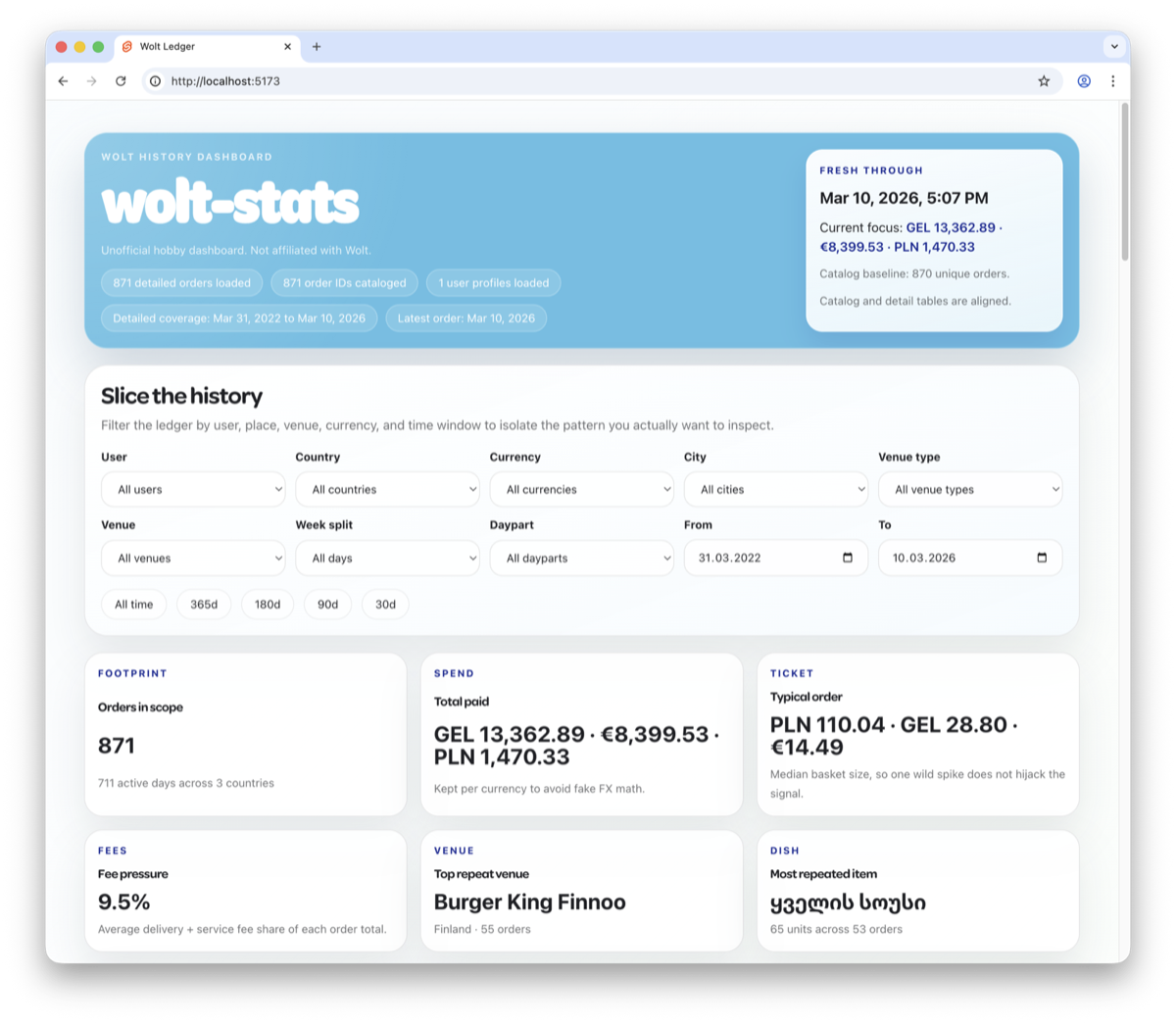
Homebrew is the recommended path on macOS and Linux. Building from source is a single go build.
# One-liner — tap is added implicitly
brew install mekedron/tap/wolt-cli

# Or add the tap first, then install:
brew tap mekedron/tap
brew install wolt-cli# Requires Go 1.26+
git clone https://github.com/mekedron/wolt-cli.git
cd wolt-cli
go build -o bin/wolt ./cmd/wolt
./bin/wolt --helpOpens managed Chrome at 127.0.0.1:9222, waits for you to sign in to wolt.com, and saves the cookies + tokens locally. Manual fallback works too.
wolt login
wolt login --wtoken "<jwt>" --wrtoken "<refresh>"Status validates the saved session against /v1/user/me. Expired tokens auto-refresh; if that fails you get a friendly hint to re-run wolt login.
wolt status --verbose
wolt account --format jsonOne ranked list with wolt top, a one-line overview with wolt feed --summary, or pipe straight into jq for automation.
wolt top 10
wolt feed --summary
wolt venues --query "ramen" --format jsonFive steps, all in your terminal. No order is placed; checkout is preview only.
wolt top ranks venues across every curated feed section. wolt venues --query narrows by keyword. Both print copy-paste-ready slugs.
wolt top 10
wolt venues --query "burger king" --limit 10Use --query for assortment search or --include-options for the full option matrix.
wolt venue menu burger-king-finnoo --query "whopper" --include-optionsvenue item renders the option groups, their values, and min/max requirements.
wolt venue item burger-king-finnoo <item-id>
wolt venue item "https://wolt.com/.../venue/burger-king-finnoo/itemid-<id>"Repeatable --option Group=Value resolves option values by case-insensitive name — no need to copy 24-char IDs by hand.
wolt cart add burger-king-finnoo --query "WHOPPER Meal" \
  --option "Drink=Coca-Cola Zero" \
  --option "Side=Fries L" \
--count 1Project items, fees, and totals — nothing is submitted.
wolt cart --details --venue-id <venue-id>
wolt checkout --delivery-mode standard --venue-id <venue-id>wolt login / logout / statusBrowser-driven login via managed Chrome. Manual token fallback. Automatic refresh with actionable auth errors.
wolt feedSection-grouped discovery home page. Add --summary for a one-line-per-section overview.
wolt topFlatten the feed into a single top-N ranked table. Default 10. Dedupes by venue.
wolt venuesFlat list with filters: --query, --sort, --open-now, --wolt-plus, --promotions-only, pagination.
wolt venueDetails, static venue-local hours, categories, menu (full / --query / --category), single-item drilldown.
wolt cartcart · count · add · remove · clear. Add by id, URL, or name.
wolt checkoutProject totals, fees, and delivery cost from the current cart. No order placement.
wolt accountProfile · orders · addresses · payments · favourites. Read-only by default.
wolt statsDownload the wolt-stats dashboard bundle, sync history into local SQLite (pure Go, no Node), serve on 127.0.0.1:5173, and open the browser.
--formattable · json · yaml--addresstemporary location, geocoded--lat / --loncoordinate override (paired)--localeBCP-47 locale tag--no-colordisable ANSI colors--verboseHTTP trace + diagnostics--limit / --offset / --pagepagination on list commands--show-highlightsforce / auto / hide Highlights columnWOLT_BADGES_PLAIN=1plain-text badge labelsTwo ways in. Pipe wolt --format json straight into a shell-driving agent (Codex CLI, Cursor, Cline, Aider), or wire up the bundled wolt-mcp server for typed Model Context Protocol tool calls in Claude Desktop, Claude Code, and any other MCP host.
wolt-mcp ships in the same Homebrew formula as the CLI. It shares the same login on disk, so one wolt login unlocks every auth-gated tool — wolt_cart_show, wolt_account_orders, wolt_checkout_preview, and all the rest.
{
  "mcpServers": {
    "wolt": { "command": "wolt-mcp" }
  }
}Pipe wolt feed --format json straight into prompts. The flag surface is small and stable enough for Claude to drive cart building end-to-end without supervision.
Drop the one-liner below into claude_desktop_config.json and Claude gets 25 typed tools — feed, search, venue menu, cart, checkout preview — backed by the bundled wolt-mcp binary. No wrappers, no glue code.
Drop a 5-line AgentSkill that shells out to wolt. The Markdown personality model means scope, memory, and permissions sit alongside your CLI calls — no glue code needed.
A 10 MB Go-binary AI agent meets a Go-binary CLI. Native MCP support means you can wire wolt onto a Raspberry Pi or a $10 RISC-V board and drive carts from your sofa.
Ask Cursor's Agent to drive wolt cart add … from the chat side-panel. Tool calls land in your terminal exactly as a human would type them.
Shell-first agent inside VS Code. Reads wolt --help once, then drives discovery, cart, and checkout preview from the chat panel.
OpenAI's shell-native coder. Pipe wolt --format json straight into a prompt, or attach the wolt-mcp server for typed tool calls. Both work; the shell flow is one command.
Pure-terminal pair-programmer. Point it at a repo and it'll read the docs, scaffold a script, and run wolt to confirm the shape of the output it just generated.
# 1. Discover
wolt venues --query ramen --sort rating --format json

# 2. Read the menu
wolt venue menu <slug> --query tonkotsu --format json

# 3. Build the cart by name
wolt cart add <slug> --query "Tonkotsu Ramen"
wolt cart add <slug> --query "Genmaicha"

# 4. Preview the checkout (no order placed)
wolt checkout --format jsonThe CLI is read-only by default and never places a real order — agents can browse, build carts, and project totals without spending your money. wolt checkout is a preview.
No. wolt-cli is an unofficial, community-built Go CLI. It's not affiliated with, endorsed by, or supported by Wolt. Use it at your own responsibility, and respect their terms of service.
No. The CLI exposes wolt checkout as a preview only, which projects totals and fees. Final order placement still happens in the official Wolt app or website, using the delivery address selected in your account.
Yes. The companion wolt-mcp binary is installed alongside wolt by the Homebrew formula and exposes 25 typed Model Context Protocol tools (discovery, venue, account, favorites, cart, checkout preview). Wire it in with { "mcpServers": { "wolt": { "command": "wolt-mcp" } } } — see docs/mcp.md for the full catalog and per-client wiring.
By default at ~/.wolt/.wolt-config.json, or wherever WOLT_CONFIG_PATH points. The file may contain wtoken, wrtoken, and cookies — keep it local and don't commit it. The project's .gitignore already ignores common config patterns.
Pass --address or --lat/--lon per command. They affect preview inputs only. Final orders still use your Wolt-saved address. --lat and --lon must be supplied together; --address can't be combined with them.
Anywhere Go 1.26+ builds: macOS, Linux, and Windows. Homebrew is the smoothest path on macOS and Linux.
Open an issue or PR on the GitHub repository. Run go test ./... and make lint before submitting.
One brew install, one wolt login, then wolt top 10. That's the whole flow.
wolt-cli is built and maintained by one developer in their free time — MIT licensed, free forever, no telemetry, no upsells. If it makes your terminal a little better, a small tip keeps it caffeinated.
By @mekedron · 100% of tips go to keeping the project alive.